If you’ve ever opened a roll of PETG, printed two parts off it, then tried to use it again three weeks later and watched it print like a steam-powered nightmare full of pops and stringing — you’ve experienced wet filament. The fix is a filament dryer: a small heated box that bakes moisture out of the spool and (in most models) lets you print directly from inside the dry environment.
This guide picks five dryers worth buying in 2026, ranked by use case rather than by spec sheet. The cheapest legitimate option is $50, the premium pick is $130, and almost everything in between is some variant of “Sunlu S2 with a different brand sticker.”
TL;DR — pick your dryer
| Tier | Dryer | Price | Best for |
|---|---|---|---|
| Best budget | Sunlu FilaDryer S2 | $50 | First-time dryer, single-printer hobbyists |
| Step-up budget | Eibos Cyclopes | $60 | Worth $10 more for stronger build + quieter fan |
| Best mid | Creality Filament Dryer Box 2.0 | $60 | Bambu / Creality printer ecosystem buyers |
| Best 4-spool | Sunlu FilaDryer S4 | $130 | AMS owners, multi-color printers, casual sellers |
| Premium | Polymaker PolyDryer Box | $130 | Engineering materials, print farms, modular setup |
If you only care about the bottom line: buy the Sunlu FilaDryer S2 unless you have a specific reason to spend more. It’s been the default budget pick for 4 years and the answer doesn’t change in 2026.
Why you actually need one
Filament absorbs water from the air. PLA tolerates this for a few weeks before quality drops; PETG and TPU degrade in days; nylon absorbs water in hours and needs drying every print. We have a full filament storage guide that explains the chemistry, but the practical answer is: if you’ve ever heard popping during a print, seen surface bubbles on your parts, or had a previously-good spool start stringing badly — that’s wet filament, and a dryer fixes it.
Two important things a dryer does that silica gel storage cannot:
- Active drying. Silica gel passively absorbs moisture from the air around a spool, but it can’t pull moisture out of filament that’s already wet. A dryer’s heat actually drives water out of the plastic.
- Print-from-storage. Most dryers have a PTFE feed-through tube on the side. You can leave the spool inside the dryer while it’s printing, so it stays dry through long prints. For nylon and TPU, this is the difference between “barely usable” and “works perfectly.”
If you only print PLA in a dry climate, you can probably skip a dryer entirely. If you live somewhere humid, print PETG/TPU/Nylon, or just want consistent results — a $50 dryer is the cheapest meaningful upgrade you can make to print quality.
Best budget: Sunlu FilaDryer S2
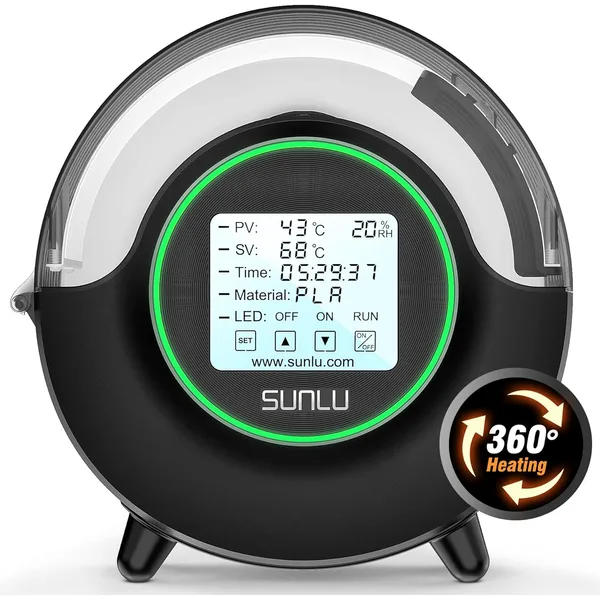
Sunlu FilaDryer S2
$50Sunlu · budget
The default budget filament dryer. Single-spool, 360° heating, runs PLA at 45°C and PETG at 65°C. Ships in millions of hobby workshops worldwide.
- 1-spool capacity, 360° heating
- Print directly from box via PTFE tube
- PLA, PETG, TPU, ABS, Nylon presets
The Sunlu S2 is the default 3D printing budget filament dryer in 2026, and has been since ~2022. It’s not the prettiest, the quietest, or the most accurate — but at $50, it’s the cheapest unit that actually works as advertised, and millions of hobbyists already own one. Community support is enormous and the failure rate is famously low.
What it does well:
- Real heat output, not the theater you see in cheaper knock-offs. The S2 actually hits 70°C and holds it. Many sub-$40 dryers claim the same temperature range but bottom out at 50–55°C, which isn’t enough for ABS or nylon.
- Built-in PTFE feed tube for print-from-dryer use. You can leave the spool loaded for days of PETG prints without re-absorbing moisture.
- 5 material presets (PLA, PETG, TPU, ABS, Nylon) that just work — no temperature dial fiddling.
- 360° internal heating so the spool dries evenly instead of getting hot only on one side.
What it doesn’t do well:
- Single-spool only. You can’t dry your AMS multicolor library in one batch.
- The fan is audible — not loud enough to annoy you in a workshop, but you’ll notice it in a quiet bedroom.
- The display interface is functional but feels cheap.
Buy this if: This is your first filament dryer and you want the most-recommended unit in the hobby.
Don’t buy this if: You print nylon every day (the slightly more expensive Polymaker handles continuous high-temp drying better), or you need to dry 4+ spools at once (get the S4 below).
Step-up budget: Eibos Cyclopes
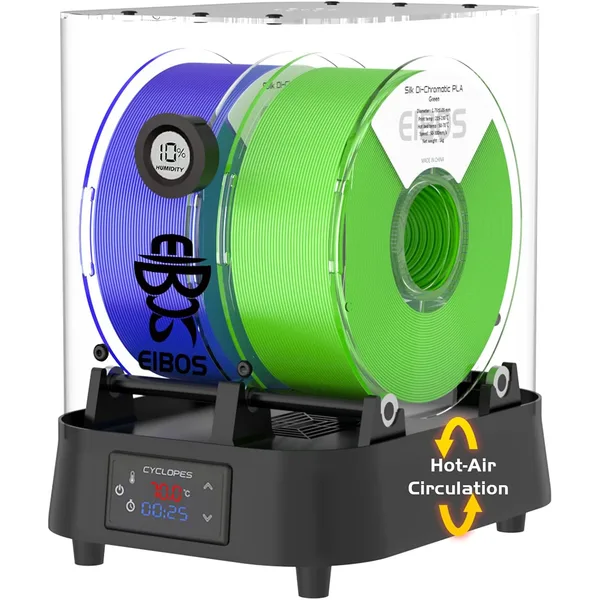
Eibos Cyclopes Filament Dryer
$60Eibos · budget
Stronger competitor to the Sunlu S2 — faster heating, better temperature stability, and a more polished build for slightly more money.
- 1-spool, faster heat-up than Sunlu S2
- Adjustable 35-70°C with 24h timer
- Quieter fan than competitors
The Eibos Cyclopes is what you buy if you’ve used a Sunlu S2 and decided “I want this, but slightly nicer.” It’s $10 more than the S2 and the differences are small but meaningful: faster heat-up, more accurate temperature control, a quieter fan, and a slightly more refined build.
In side-by-side tests by community reviewers, the Cyclopes:
- Reaches target temperature 2–3 minutes faster than the S2
- Holds temperature within ±2°C of setpoint vs the S2’s ±3°C swing
- Runs noticeably quieter under sustained operation — closer to a refrigerator hum than the S2’s audible fan
- Has a slightly better-built case that doesn’t creak when you press on the lid
None of these are deal-breakers for the S2, but if you’re going to use a dryer daily, the small QoL improvements add up. The Cyclopes is the “buy slightly nicer” pick.
Buy this if: You’ve outgrown the S2 or you want the best single-spool dryer without jumping to premium pricing.
Don’t buy this if: $10 matters for the budget and you don’t care about the QoL bumps. The S2 is still excellent.
Best mid: Creality Filament Dryer Box 2.0
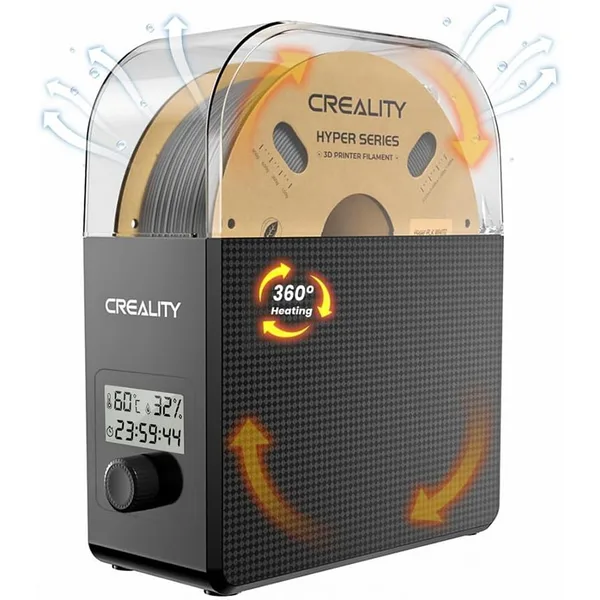
Creality Filament Dryer Box 2.0
$60Creality · mid
Creality's answer to Sunlu — 1-spool capacity with hot air circulation and a clean LCD interface. The most popular Sunlu alternative on Amazon.
- 1-spool, hot air circulation
- Adjustable 35-70°C, 0-24h timer
- Pre-tested by Creality QC
Functionally similar to the Sunlu S2 — single-spool, hot air circulation, presets for major materials — but with Creality branding, slightly different heat distribution, and the convenience of buying everything from one ecosystem if you already own a Creality printer.
The Box 2.0 is the closest direct competitor to the Sunlu S2 in terms of features and price. It runs at the same temperature range, holds 1 spool the same way, and uses the same print-from-dryer PTFE setup. Where it differs:
- Slightly more even heat distribution — Creality designed the airflow to circulate around the spool rather than heating from one side.
- Bigger LCD screen with cleaner UI than the Sunlu.
- No multi-material library by default — you adjust temperature manually rather than picking from PLA/PETG/Nylon presets. Mild downside but easy to learn.
- Backed by Creality customer service, which is generally faster than buying through small accessory brands on Amazon.
In practice, the Sunlu S2 and Creality Box 2.0 perform identically. Pick whichever is cheaper on the day you buy, or whichever ecosystem you’re already in.
Buy this if: You own a Creality printer and want a single-vendor experience, or the Box 2.0 is on sale.
Don’t buy this if: The Sunlu S2 is cheaper today — the Sunlu has a deeper community and more reviews.
Best 4-spool: Sunlu FilaDryer S4
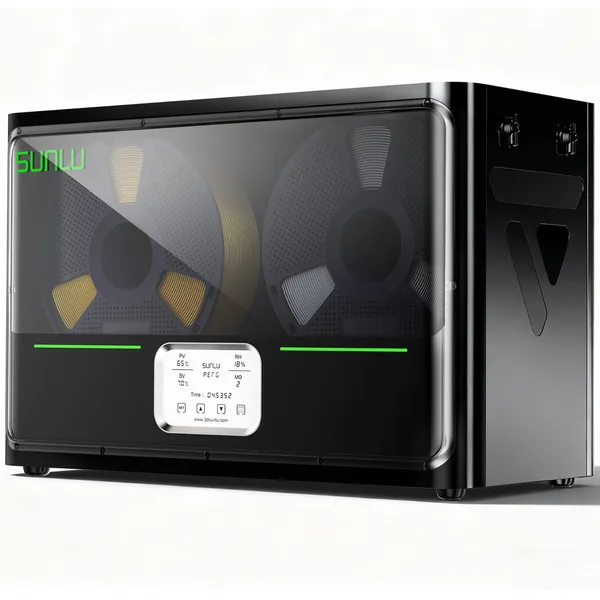
Sunlu FilaDryer S4
$130Sunlu · mid
Holds 4 spools at once. The right pick for AMS owners, multi-color printers, or anyone tired of swapping spools in and out of a single-bay dryer.
- 4-spool capacity, dries all at once
- Independent feed channels
- PLA, PETG, TPU, ABS, Nylon presets
If you own a Bambu printer with AMS, a Prusa XL with multi-tool, or any setup that loads from multiple spools at once, single-spool dryers become annoying fast. You either dry one spool at a time and rotate (slow) or accept that some of your loaded spools will be wet (defeats the purpose).
The Sunlu S4 fixes this by holding four spools in a single chamber with shared heating and four independent PTFE feed channels. Drop your AMS lineup in, set the temperature, and 8 hours later they’re all dry and ready to print.
The S4 is essentially “four S2s in one box, sharing a heater.” Same temperature range, same presets, same print-from-dryer functionality — just multiplied by 4. The price reflects that: ~$130 vs $50 for the S2.
When the S4 makes sense:
- You own a Bambu Lab AMS or AMS lite. Drying 4 AMS spools at once is the killer use case.
- You print multi-color regularly. Nothing worse than starting a 12-hour 4-color print and realizing one spool was wet.
- You sell prints commercially and want to keep your “active” filament library always-dry.
- You print Nylon or TPU at scale where every spool needs to be dried before every use.
When it doesn’t:
- You only have one printer with one spool slot. Stick with the S2 — the S4 is wasted capacity.
- You’re a casual hobbyist printing once a week. Just dry the spool you’re about to use; no need for parallel drying.
Buy this if: You have an AMS, run multi-color regularly, or do any kind of small-scale commercial printing.
Premium: Polymaker PolyDryer Box
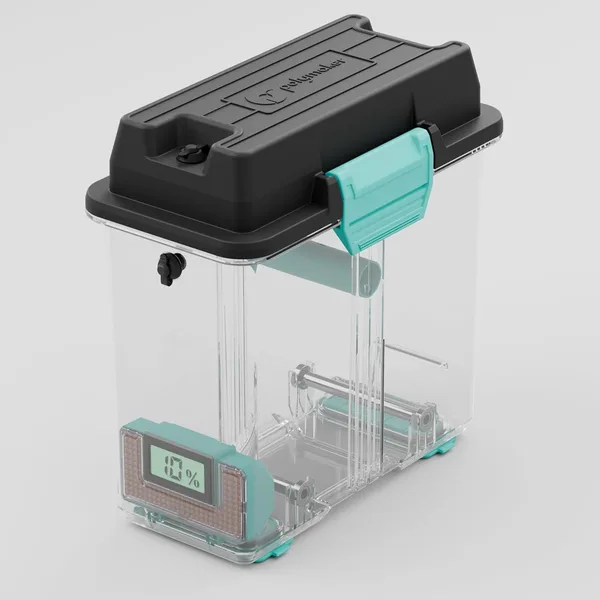
Polymaker PolyDryer Box
$130Polymaker · premium
The premium pick. Polymaker's engineering pedigree shows up in temperature stability, build quality, and the ability to chain multiple boxes together for print farms.
- 1-spool, modular (chain multiple boxes)
- Best temperature stability in class
- Engineered for nylon and high-temp materials
Polymaker is the most engineering-driven filament brand on the market, and the PolyDryer Box is their bid for the premium tier. At $130, it’s roughly 2.5× the price of the Sunlu S2, and the value question is whether the extras justify it.
What you get for the premium:
- Better temperature stability — within ±1°C of setpoint, the tightest in the consumer market.
- Higher max temperature (90°C continuous) for serious nylon and PA-CF drying.
- Modular design — PolyDryer boxes can be chained together. Two boxes = 2 spools simultaneously, three = 3, etc. Print farms can scale linearly without buying a single huge unit.
- Premium build quality — quieter fan, cleaner display, more durable enclosure that survives daily commercial use.
- Polymaker customer support — engineers respond to support emails, and they have a track record of honoring warranty claims.
The honest take: for hobbyists, this is overkill. The Sunlu S2 dries PLA and PETG just fine, and $80 of savings buys a lot of filament. For engineers, print farms, and people who print Nylon/PA-CF/PC daily, the temperature stability and modular scaling start to matter. The Polymaker is the right pick if you’ve already done the cost-benefit math and “this is going to make me money or save me real time” is a yes.
Buy this if: You print engineering materials regularly, you’re scaling a print farm, or you’ve decided you want the best in class.
Don’t buy this if: You’re a casual or hobby printer. The savings vs the S2 are larger than the quality difference.
Buying guide: what actually matters in a filament dryer
1. Maximum temperature
The single most important spec. Most cheap “filament dryers” top out at 50–55°C, which is enough for PLA and barely enough for PETG. You want a dryer that hits at least 70°C for ABS, ASA, and to dry PETG quickly. 80°C+ is required for Nylon.
| Material | Drying temp | Drying time |
|---|---|---|
| PLA | 45°C | 4–6 hours |
| PETG | 65°C | 6–8 hours |
| ABS / ASA | 70°C | 4–6 hours |
| TPU | 50°C | 8–12 hours |
| Nylon (PA) | 80°C | 12–16 hours |
| PC, PA-CF | 90°C | 12–16 hours |
All five dryers in this guide handle PLA, PETG, ABS, and TPU comfortably. Only the Polymaker PolyDryer reliably hits the 90°C tier needed for serious PC and PA-CF work.
2. Print-from-dryer (PTFE feed)
Crucial feature. A dryer that only dries spools (with no way to print from inside) means you have to dry → unload → load on printer → print fast before moisture re-absorbs. Useless for Nylon and TPU which absorb water in hours.
All five picks in this guide have PTFE feed tubes that let you leave the spool inside the dryer during printing. Skip any dryer that doesn’t have this.
3. Spool capacity
Single-spool is fine for most hobbyists. Multi-spool matters if:
- You own an AMS or multi-tool printer that loads from multiple spools simultaneously
- You run a print farm and need to keep many spools loaded
- You print engineering materials and want to keep them dried in batches
For ~80% of users, single-spool is the right answer. Don’t pay for multi-spool capacity you won’t use.
4. Temperature accuracy
Cheaper dryers have ±5°C swings around the setpoint. Mid-range dryers swing ±3°C. The Polymaker holds ±1°C. For PLA and PETG drying, anything within ±5°C is fine. For Nylon and PC, accuracy starts to matter — wide swings can deform spools or fail to dry consistently.
5. Noise
Filament dryers run for 4–16 hours per drying cycle. If your printer is in a bedroom or office, fan noise becomes important. The Eibos Cyclopes and Polymaker are noticeably quieter than the Sunlu S2 in side-by-side tests. The Creality Box 2.0 sits in the middle.
Things to skip
A few dryers and storage tools you’ll see recommended elsewhere that we’d avoid:
- No-name $30 “filament dryers” on Amazon. They top out at 50°C, lack a print-from-dryer feed, and the included thermometer is decorative. Skip — pay $20 more for a Sunlu that actually works.
- Dehumidified vacuum chambers. A few brands sell elaborate “dry storage vaults” for $300+. They’re great if you’re a print farm with 50+ spools, totally overkill otherwise.
- DIY “food dehydrator” hacks. A countertop food dehydrator does work for drying filament, but the reason it’s not on this list is it doesn’t have a PTFE feed-through, so you can’t print from storage. Acceptable as a once-in-a-while emergency dryer, not as your primary tool.
- The Sunlu S1. Older single-spool model that the S2 replaced. If you find one used for cheap, it’s fine — but new, the S2 costs the same and is meaningfully better.
A realistic dryer workflow
Once you have a dryer, the workflow that survives real life:
- Active spool lives in the dryer 24/7, set to your current material’s storage temp (not full drying temp — usually 5°C below). Print directly through the PTFE tube.
- Recently-opened spools that you’ll use this week: store in a sealed plastic tote with bulk silica gel + a hygrometer (targeting under 25% RH).
- Long-term spares: leave them in their original vacuum-sealed packaging until you need them.
We break this down further in the filament storage guide.
What you’ll spend in your first month
Dryer + a few accessories to actually use it well:
- Filament dryer (S2 or equivalent): $50
- Mini hygrometer for humidity monitoring: $5
- 2 lbs of bulk silica gel beads: $15
- An airtight plastic tote for backup storage: $15
- Total: $85
For most hobbyists, that’s the entire dry-storage budget for life. The dryer pays for itself within 2–3 months in reduced filament waste — failed prints from wet filament cost you 2–8 grams per attempt, which adds up fast over a year.
How wet filament costs you money
Wet filament doesn’t just print badly — it wastes filament to extra stringing, rough surfaces, support bonding failures, and outright print failures. A typical hobbyist running PETG or TPU through humid air loses 5–10% extra filament per print to moisture-related defects.
On a 50-gram print at $0.020/gram, 8% waste = $0.08 per print. Across 200 prints in a year, that’s $16 in filament wasted — a third of the dryer’s price, recovered in pure waste reduction. Higher-volume printers break even in months.
You can model this directly with our filament cost calculator — bump the waste factor slider from 3% to 8% and watch the per-print cost climb.
Frequently asked questions
Do I really need a filament dryer if I only print PLA?
In a dry climate (under 35% relative humidity, typical of the US Southwest and Mountain West), no — PLA tolerates open storage for weeks. In a humid climate (45%+ RH, most of the US), yes — PLA degrades within 1–2 weeks of open storage, and a $50 dryer pays for itself in waste reduction within months.
Can I just use a food dehydrator instead?
For drying spools, yes — a $40 countertop food dehydrator hits 60–70°C and works fine. The catch is you can’t print from a food dehydrator, so the spool reabsorbs moisture as soon as you take it out. Fine as a once-in-a-while emergency tool, not great as your primary dry-storage solution.
How long should I dry a wet spool?
Material-dependent: PLA needs 4–6 hours at 45°C, PETG needs 6–8 hours at 65°C, Nylon needs 12–16 hours at 80°C. Most dryers have presets for these — if yours doesn’t, the table earlier in this article has the numbers.
Can a filament dryer regenerate silica gel beads too?
Yes, in a pinch. Set the dryer to 70°C and run it for 4 hours with the silica gel beads inside (not the spool). The beads will turn from saturated color back to dry color and be ready to reuse. Faster than oven-baking.
What’s the difference between drying and storing?
Drying removes moisture that’s already in the filament — requires active heat, takes 4–16 hours. Storing prevents new moisture from getting in — passive, requires sealed environment + desiccant. You need both: dry first, then store.
Will drying damage my filament?
If you stay within recommended temperatures, no. The danger zone is going above recommended temperature for a given material — drying PLA at 60°C+ can soften the spool and cause it to deform; drying TPU above 50°C can fuse the layers together. Always use the preset for your material type, or check the table above before guessing.
Should I dry filament that comes vacuum-sealed from the manufacturer?
Usually no. Vacuum-sealed spools from reputable brands (Bambu, Polymaker, Prusa, MatterHackers, Sunlu) ship dry — they include silica gel and seal in dry conditions. Pop the seal, load, print. If you’re buying budget no-name filament from sketchy sellers, drying first is reasonable insurance.